Project

1 / 15

Dial-In Coffee

Research

Recipe model

UX and UI design

App development

Chrome extension

Website

2026

The task

Vellutto is an online store in Bussum, the Netherlands, for espresso equipment built around pressure profiling and flow control. Most brewing calculators assume a flat nine bar shot. They give the same recipe whatever the machine does with pressure.

We built Dial-In Coffee for Vellutto. You say what you brew, how much coffee you use, how dark the roast is and what your machine does with pressure. You get a yield, a ratio, a time, a water temperature and a grind direction to start from.

One product, four parts

Map It made the whole product: the recipe model, the UX and UI, and the development. The calculator is a Chrome extension, and the same source builds the calculator on the vellutto.eu home page. The iOS and Android app adds your beans, your equipment, troubleshooting by taste and saved recipes. A website presents the app.

How we studied it

We studied coffee sources and competing apps. Brewers tried the app, and analytics and recordings informed changes to it.

What we had to solve

  • Recipes circulate without sources, so the model names the published source behind each number, and each roast says whether its ratio is documented, interpolated or by tradition.

  • Machines shape pressure in different ways, so five kinds of profile are reduced to the same few numbers and one model produces the recipe.

  • Two copies of a calculator drift apart, so the store section is generated from the extension's own files.

  • The first cup is rarely right, so the app asks what you taste and suggests what to change next, with an option to keep the dose fixed.

  • Method, roast, profile and taste problem multiply into thousands of answers, so we ran the recipes through automated checks before release.

  • A store listing cannot let you try the app, so the website carries a working demo that uses the calculator's own model.

How Dial-In Coffee was built

Fourteen steps, from the coffee sources to an app in two stores, a Chrome extension, a calculator in the store and a website for the app.

1Understand
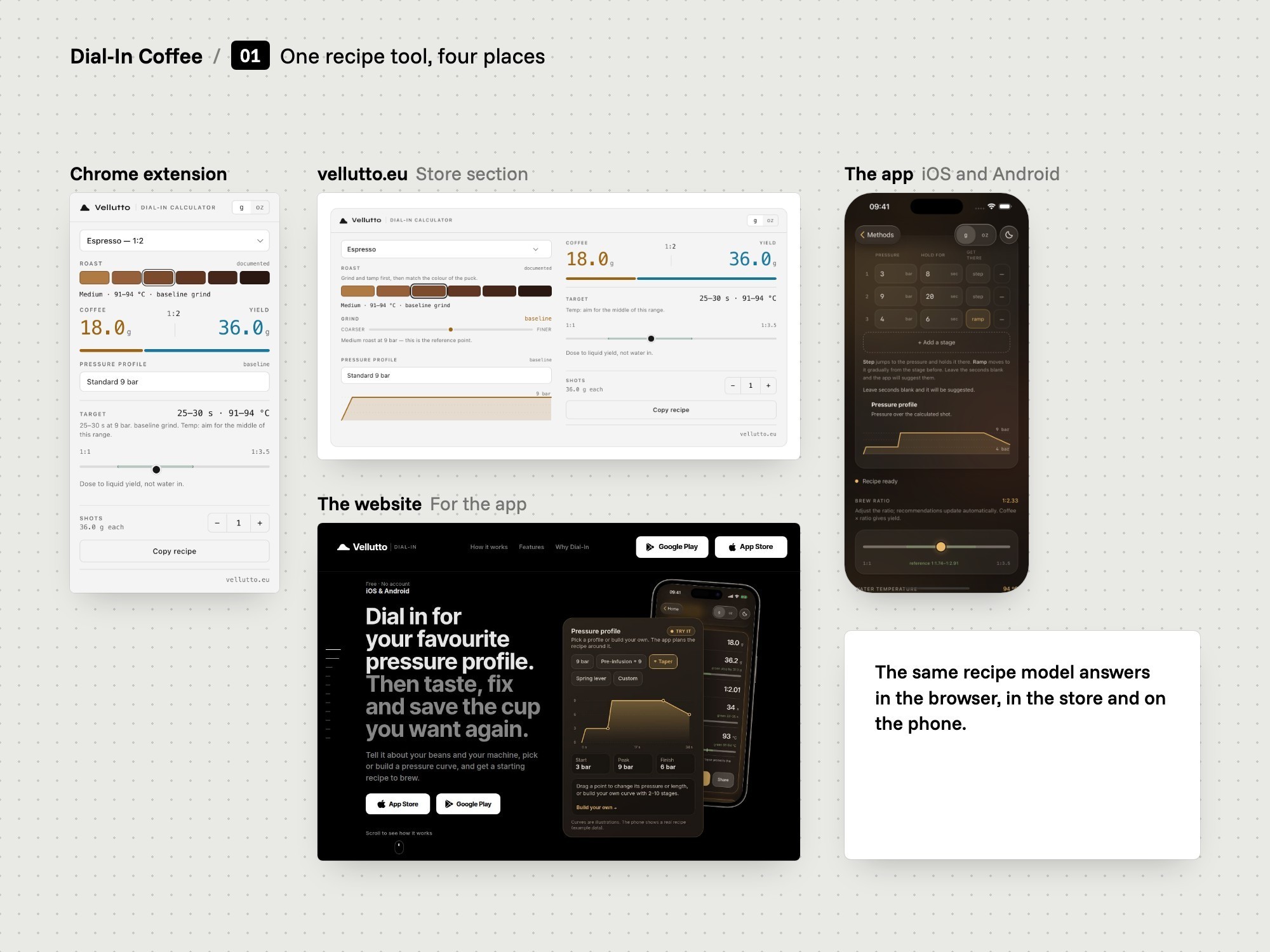
Board: One recipe tool in four places.
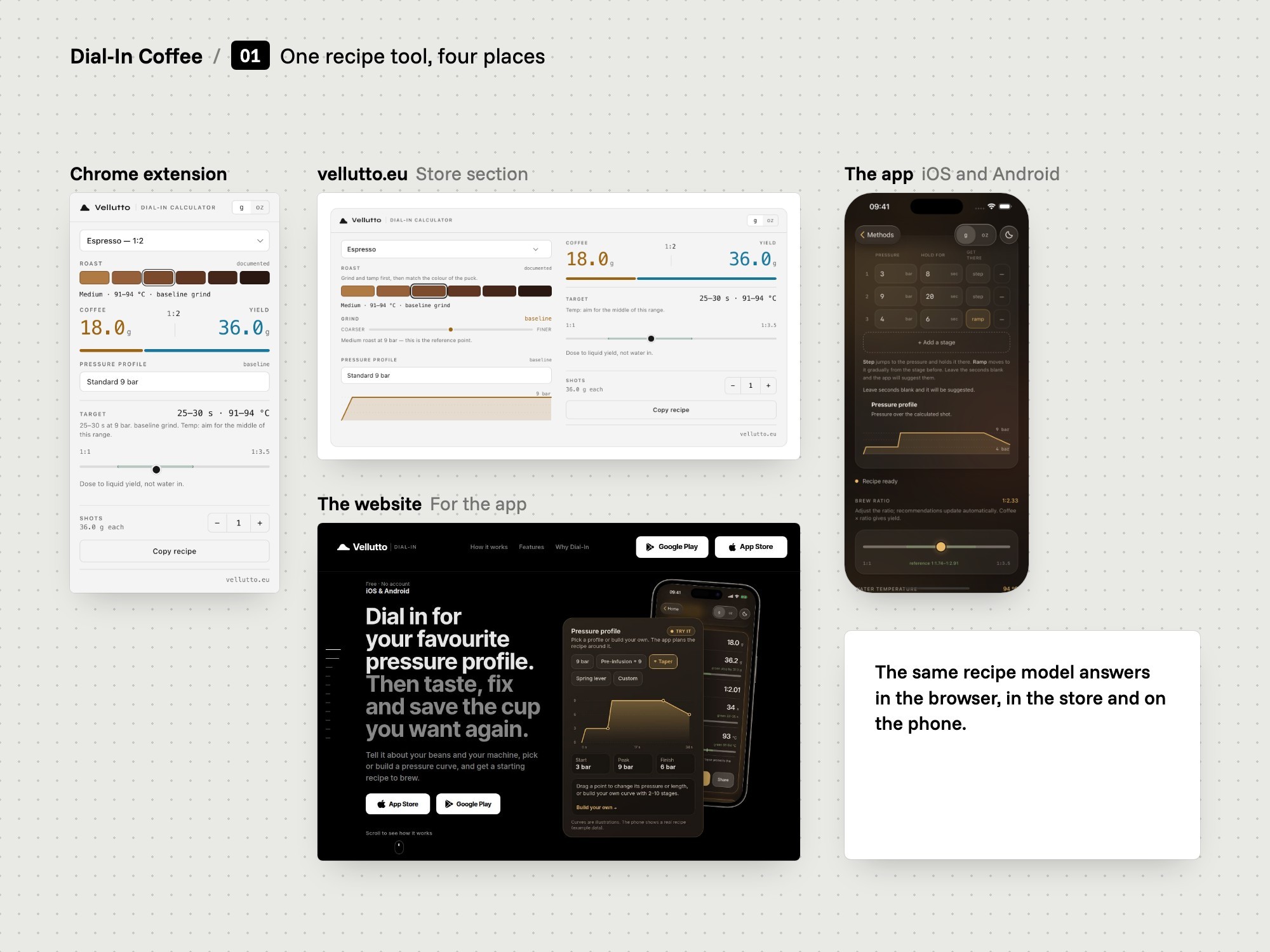
One recipe tool in four places
01

The task

We set out to build a recipe tool that asks what your machine does with pressure.

  • Pressure profiling first
  • Sources and competing apps
  • Brewers tried the app
The problem
Vellutto sells espresso equipment built around pressure profiling and flow control. Most brewing calculators assume a flat nine bar shot, so they give the same recipe whatever the machine does.
Our thinking
A store that sells pressure profiling should offer a tool that understands it. The tool should sit where brewers already are: in the browser, in the store and on the phone.
What we did
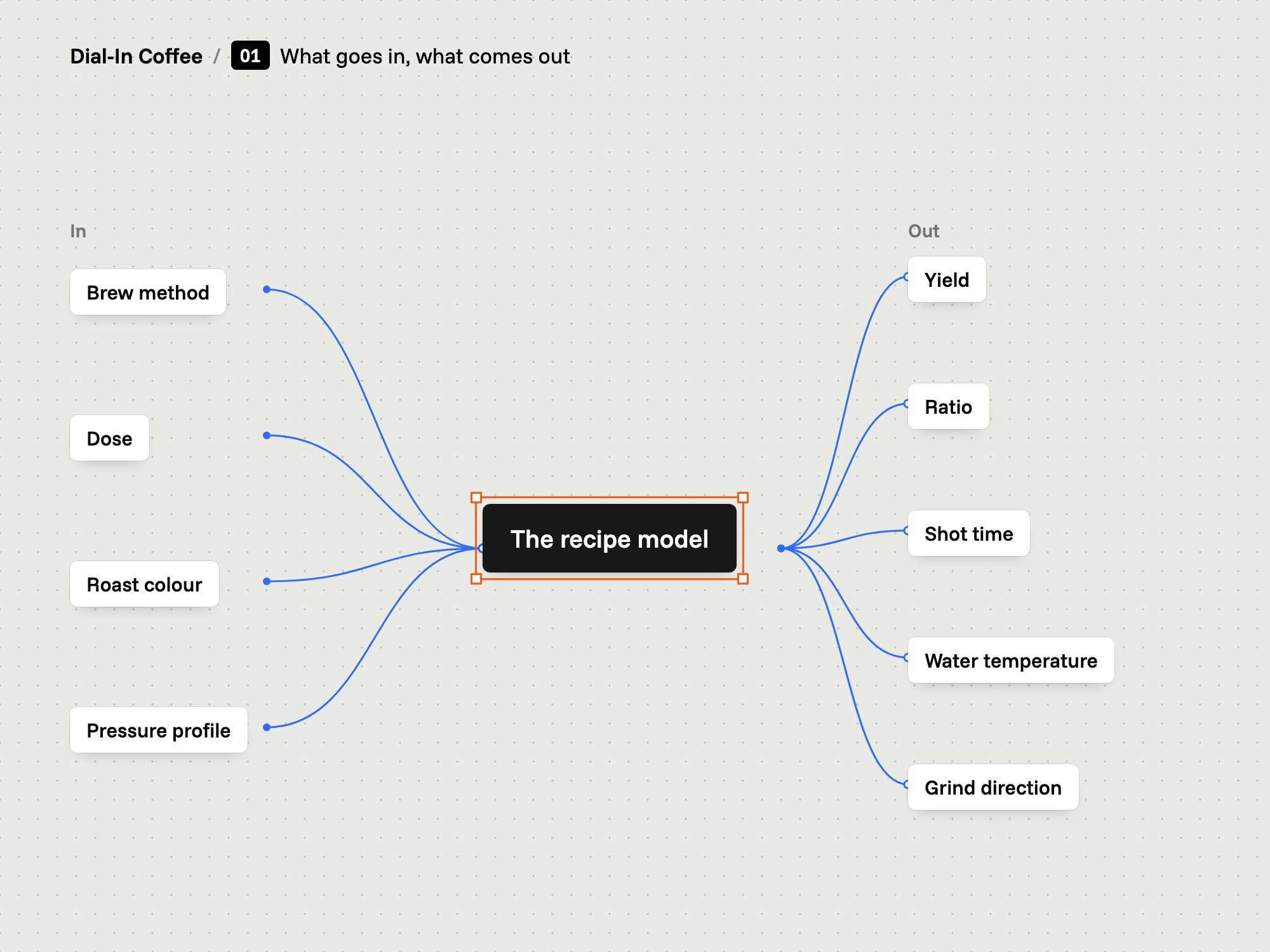
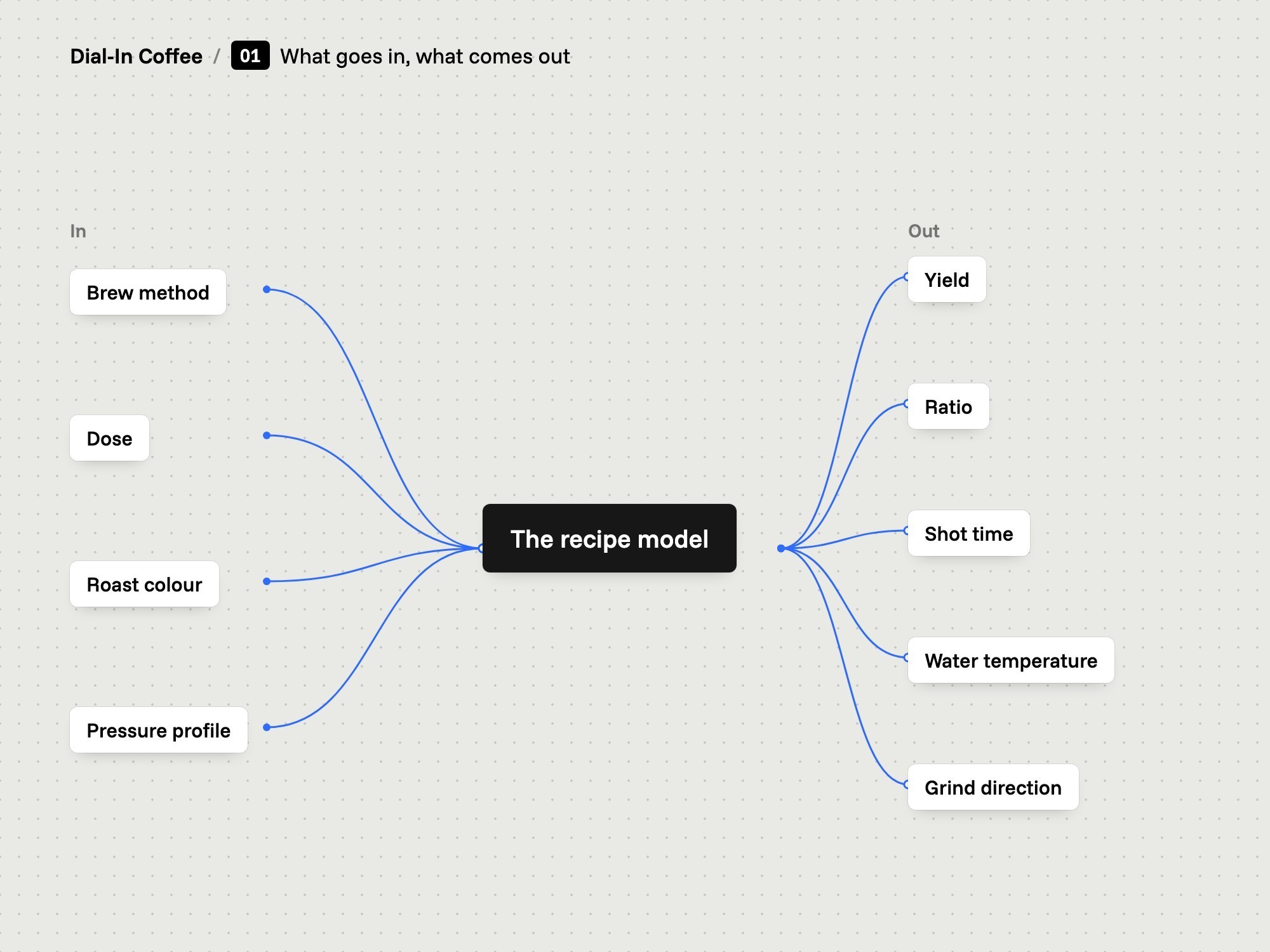
We defined the tool by the inputs a brewer already knows: the method, the dose, the roast and what the machine does with pressure. It returns a yield, a ratio, a time, a temperature and a grind direction.
How we did it
Desk research covered coffee sources and competing apps. Brewers tried the app, and analytics and recordings informed changes to it.
What changed
The product is called Dial-In Coffee. Its calculator is in the Chrome Web Store and on the vellutto.eu home page, and its app is in the App Store and on Google Play.
Board: The sources behind the model.
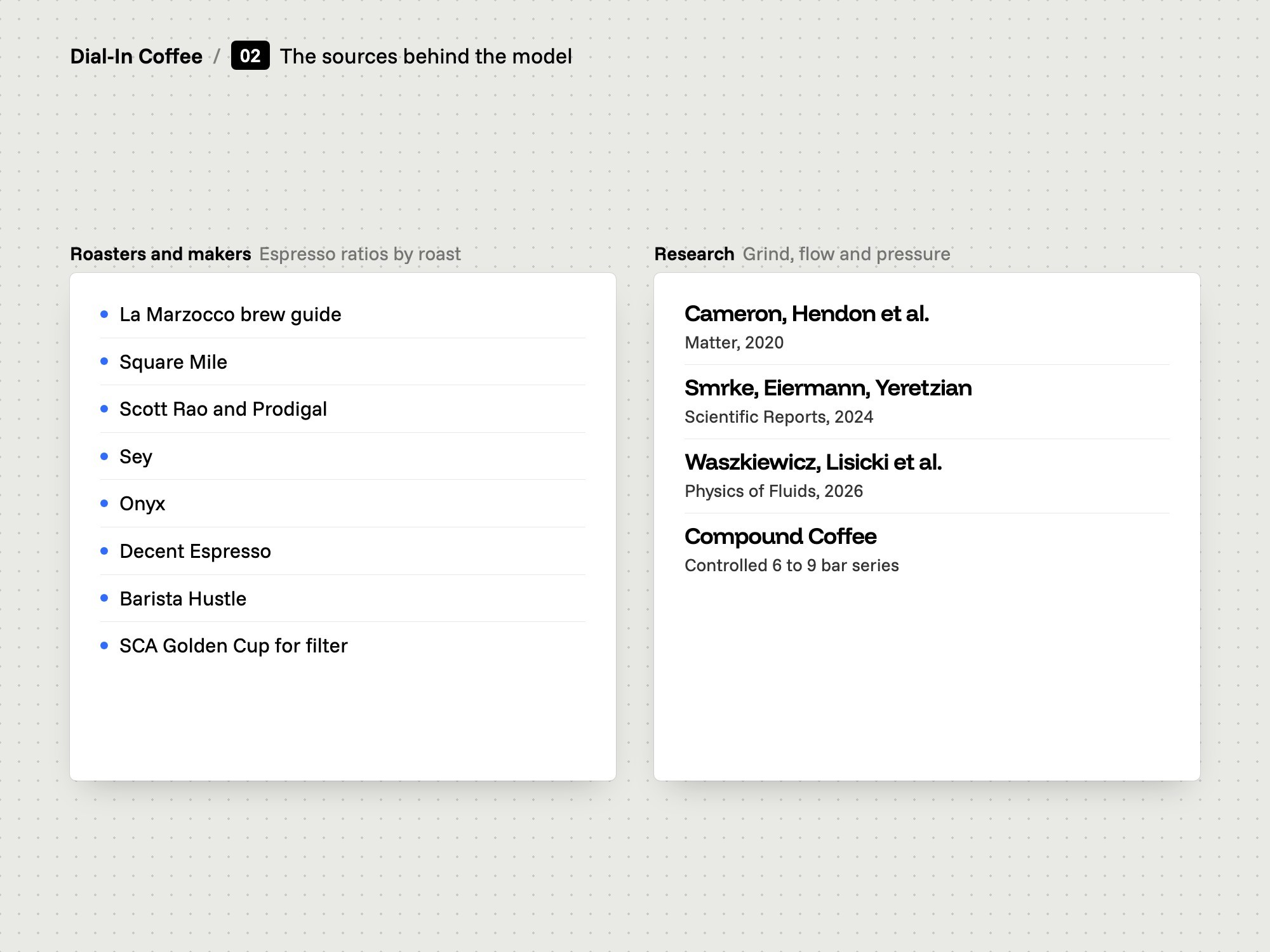
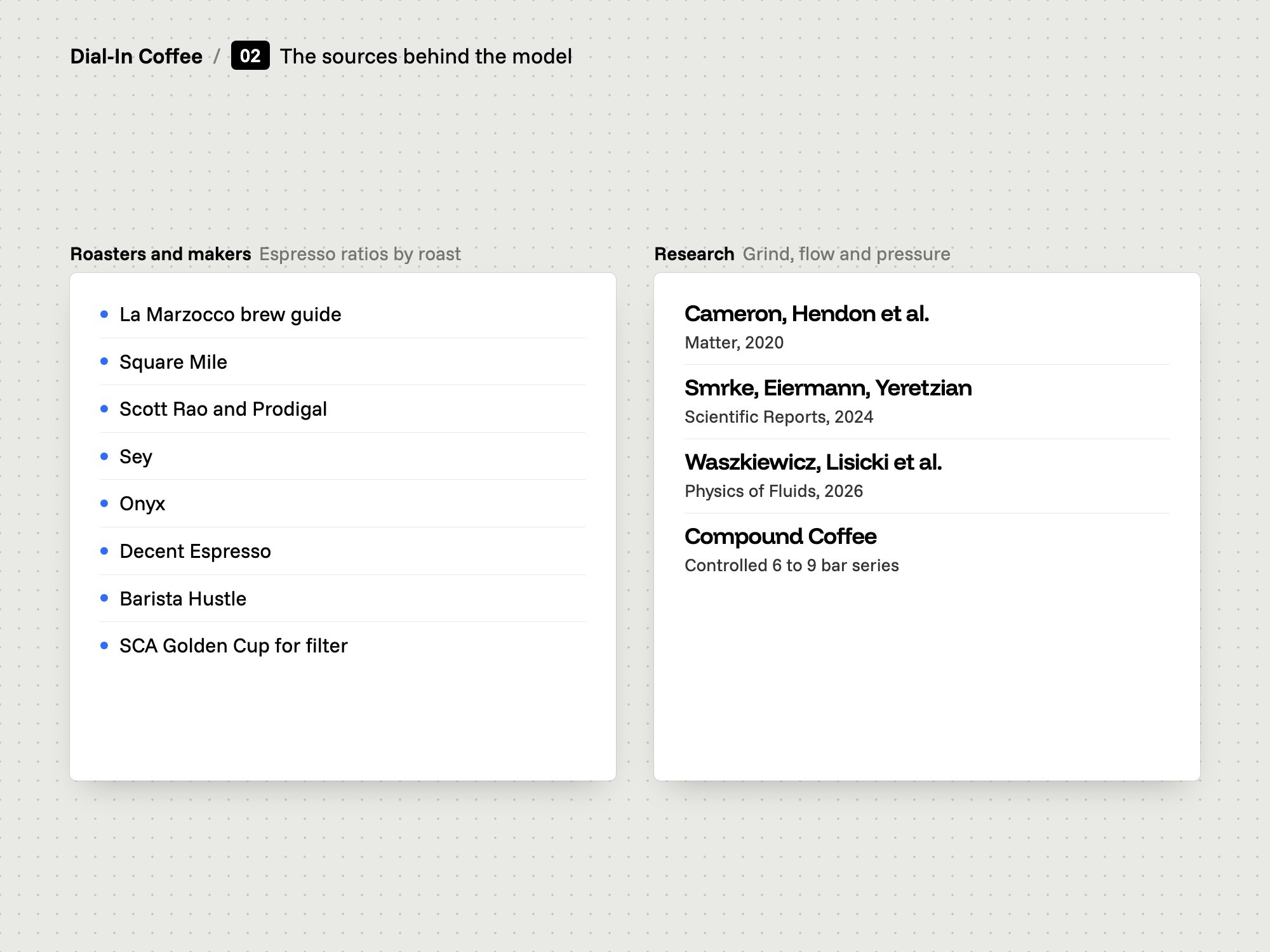
The sources behind the model
02

The sources

We tied each number in the model to a published source.

  • Manufacturers and roasters
  • Three research papers
  • Where sources disagree
The problem
Brew ratios circulate without sources. Much of what is repeated about roast-specific ratios is not supported, and for filter coffee the structured sources point in opposite directions.
Our thinking
A recommendation is only useful if you can see what it rests on. Where the evidence is thin, the tool should say so.
What we did
We collected the ratios published by La Marzocco, Square Mile, Scott Rao, Sey, Onyx, Decent Espresso and Barista Hustle, the SCA Golden Cup standard, and three papers on grind, fines and flow under pressure.
How we did it
Each source is named in the code next to the number it supports. We also wrote down what the evidence does not support, and left those effects out of the model.
What changed
The calculator's code lists what is well documented, what is inferred and what is deliberately not modelled. The Chrome Web Store listing repeats this in plain words.
2Model
Board: What goes in and what comes out.
What goes in and what comes out
03

Methods and ratios

We put 18 brew methods in one table, each with a recommended band.

  • 18 methods
  • A green band per method
  • Dose held on espresso
The problem
Espresso runs near 1:2 and filter near 1:16. A single ratio field cannot serve both, and a brewer cannot see how far a ratio is from the usual range.
Our thinking
Give every method its own default, its own recommended band and a wider range to experiment in. Show the band on the slider.
What we did
We wrote one line per method: default ratio, recommended band, slider range and serving size or basket dose. The list covers 15 brew methods and 3 shot methods: espresso, ristretto and lungo.
How we did it
On espresso the dose stays fixed and the yield moves the ratio, because the basket sets the dose. On brew methods the number you typed last is the anchor and the other follows.
What changed
The slider shows the recommended band in green. Outside it, a hint says which way you went. Espresso opens at 18 g in and 36 g out, with a band from 1:1.5 to 1:2.5.
Board: Roast moves the espresso ratio.
Roast moves the espresso ratio
04

Roast

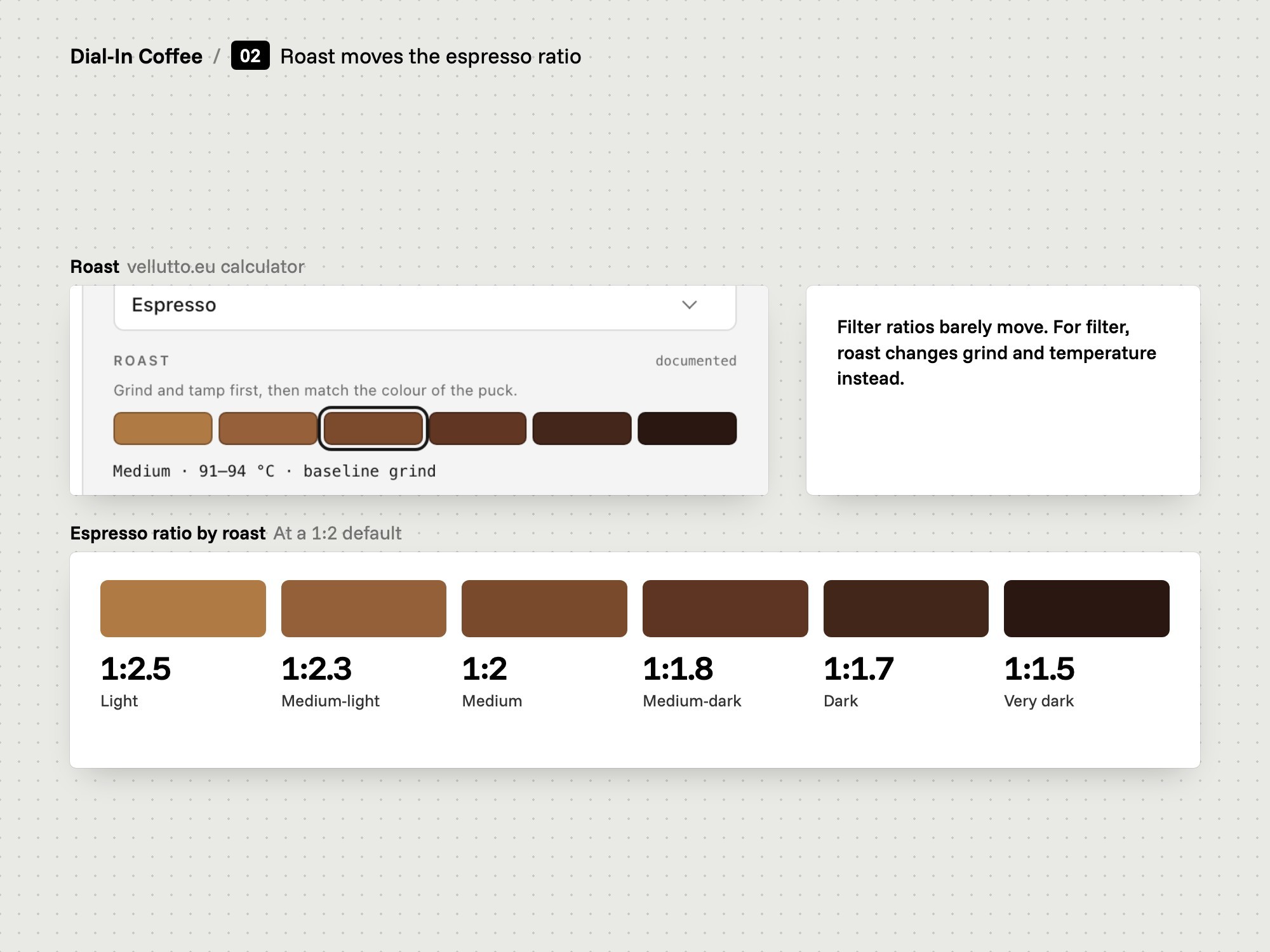
We let roast move the espresso ratio and left the filter ratio almost still.

  • 6 roast levels
  • Espresso ratio moves
  • Each number labelled
The problem
A light roast and a dark roast do not pull the same shot. For filter coffee, the sources that give roast-specific ratios disagree on the direction.
Our thinking
Move a number only when the evidence supports the move. Otherwise change grind and temperature, and say why.
What we did
We set six roast levels from light to extremely dark. On a 1:2 espresso they give 1:2.5, 1:2.3, 1:2, 1:1.8, 1:1.7 and 1:1.5. On filter the ratio stays put for light to medium and roast changes temperature and grind.
How we did it
Each roast carries a colour swatch, an approximate Agtron range, a temperature range and a grind direction. A label says whether its ratio is documented, interpolated or by tradition.
What changed
Pick a roast and the calculator shows the label next to it. Medium reads documented, with 91 to 94 °C and a baseline grind.
Board: Pressure profiles in one model.
Pressure profiles in one model
05

Pressure profiles

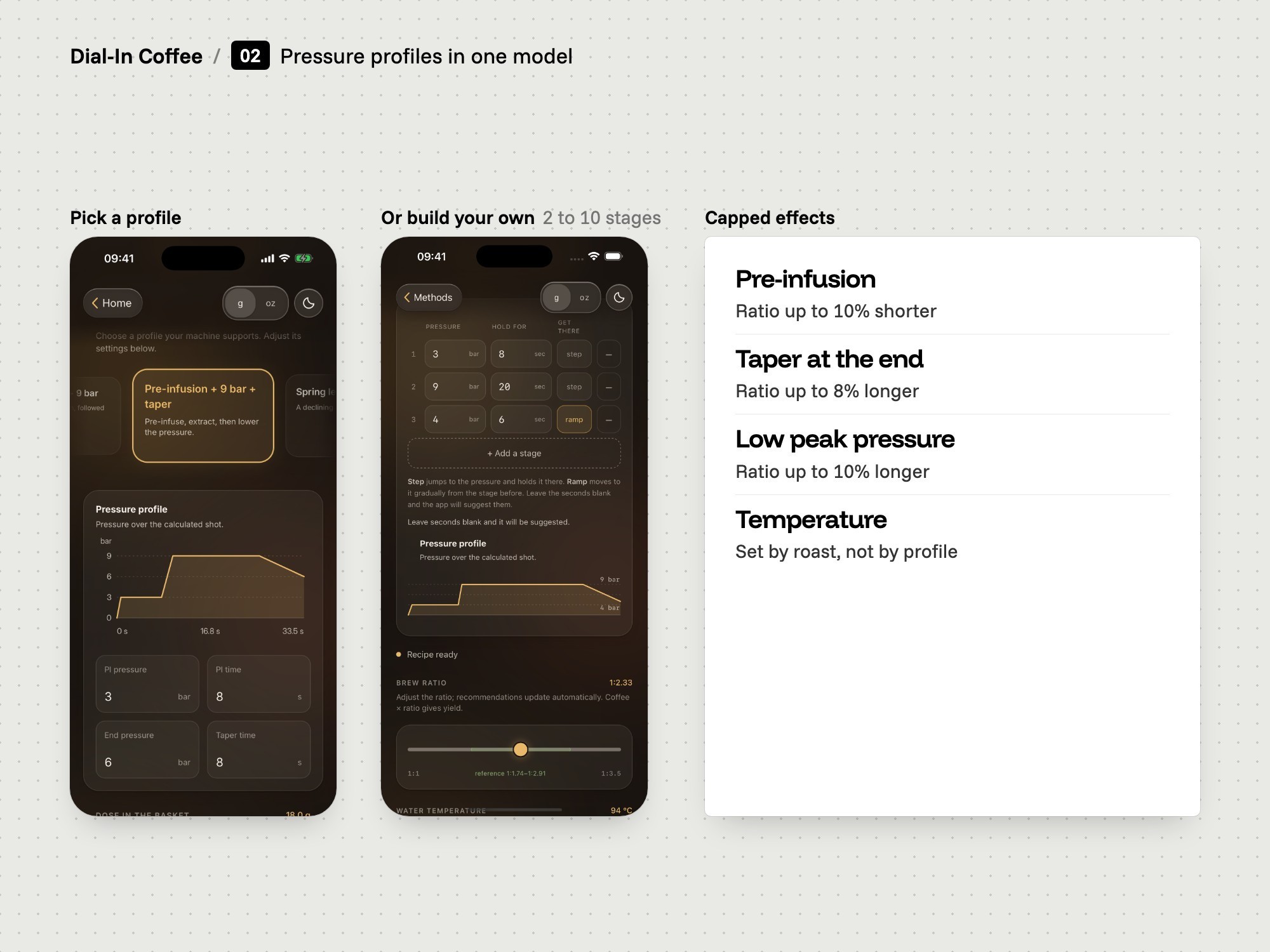
We reduced five kinds of pressure profile to one model with capped effects.

  • 5 profile modes
  • One model behind all
  • Effects capped
The problem
Lever machines, flow paddles and programmable machines all shape pressure differently. A calculator that handled each one separately would give answers that do not agree with each other.
Our thinking
Describe every profile with the same few numbers. Then one model can produce the recipe, and a custom profile behaves like a preset.
What we did
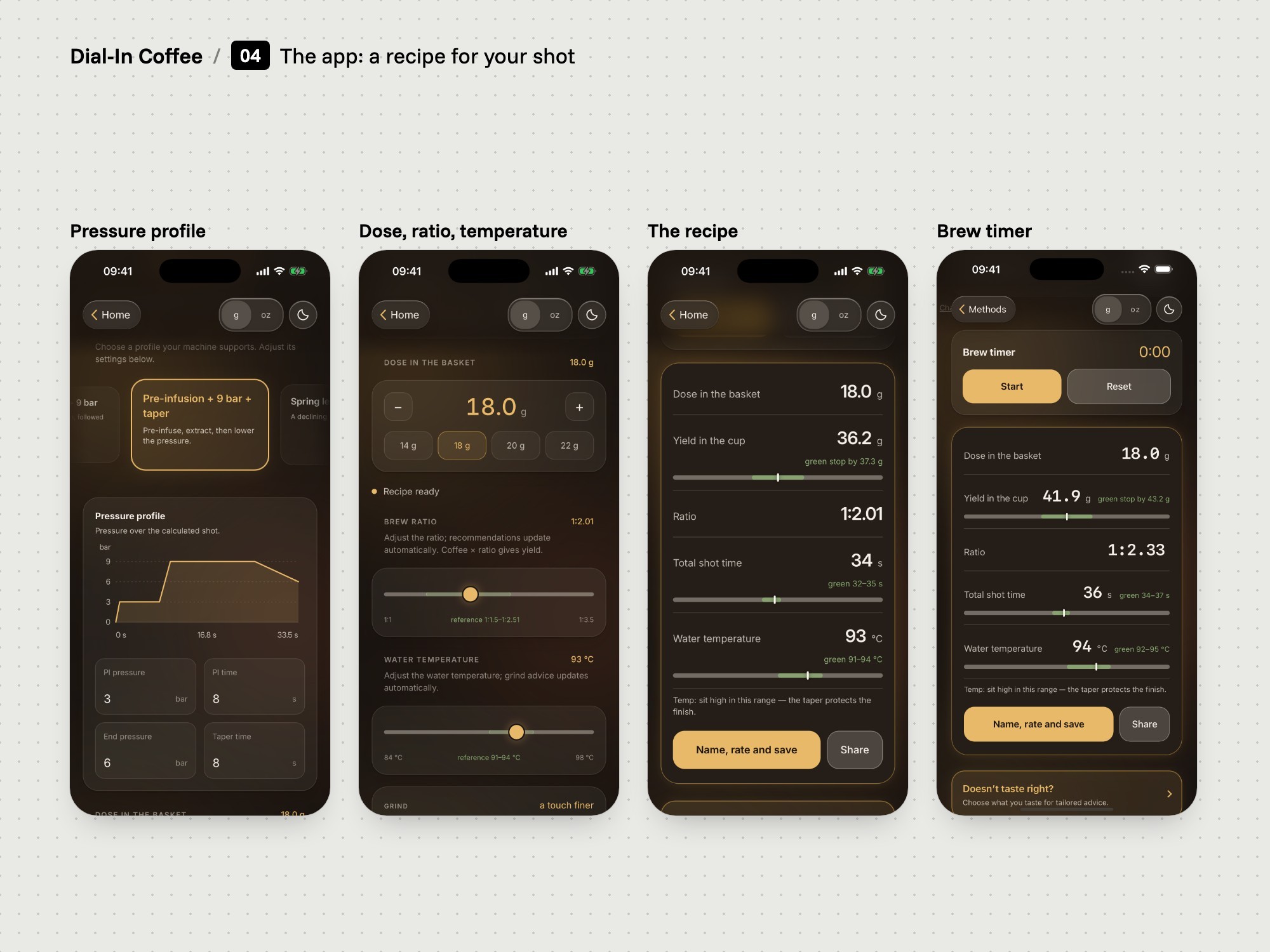
We built five modes: standard 9 bar, pre-infusion, pre-infusion with a taper, spring lever and a custom stage list. Each is reduced to pre-infusion pressure and time, peak pressure, end pressure and taper length.
How we did it
Pre-infusion shortens the ratio by up to 10%. A declining finish lengthens it by up to 8%. A peak below about 7 bar lengthens it by up to 10%. The profile does not move the temperature, and the tool makes no claim about flavour.
What changed
The pressure chart is drawn from the same numbers as the recipe, so the curve and the figures always agree. Change the pre-infusion time and both move together.
3Build
Board: The Chrome extension.
The Chrome extension
06

The Chrome extension

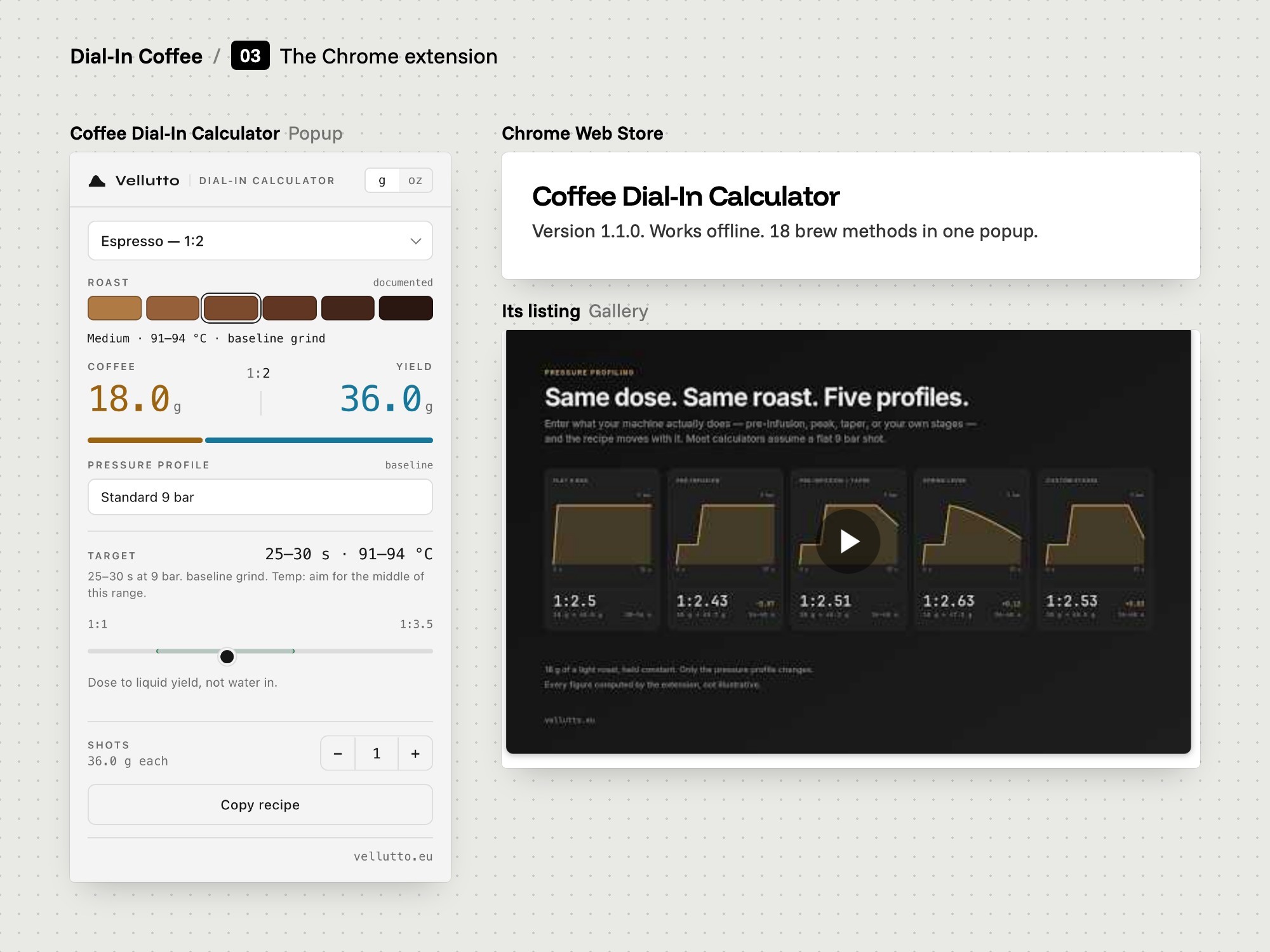
We built the calculator as a Chrome extension that works offline.

  • Opens from the toolbar
  • Storage permission only
  • Named for search
The problem
A brewer at a desk wants a number fast. Opening a site, finding a calculator and setting it up again each time is too slow.
Our thinking
Keep it small. No account, no network calls and no tracking, so there is nothing to wait for and nothing to explain.
What we did
We built the calculator as a Chrome extension with one permission, storage. It opens on espresso, medium roast and standard 9 bar: 18 g in, 36 g out.
How we did it
The model sits in three small data files for methods, roasts and profiles. Naming sits apart from the logic, so the model can be read and changed on its own.
What changed
The extension is in the Chrome Web Store as Coffee Dial-In Calculator, version 1.1.0, updated in August 2026. Its listing states that it does not collect or use your data.
Board: The calculator inside vellutto.eu.
The calculator inside vellutto.eu
07

The store section

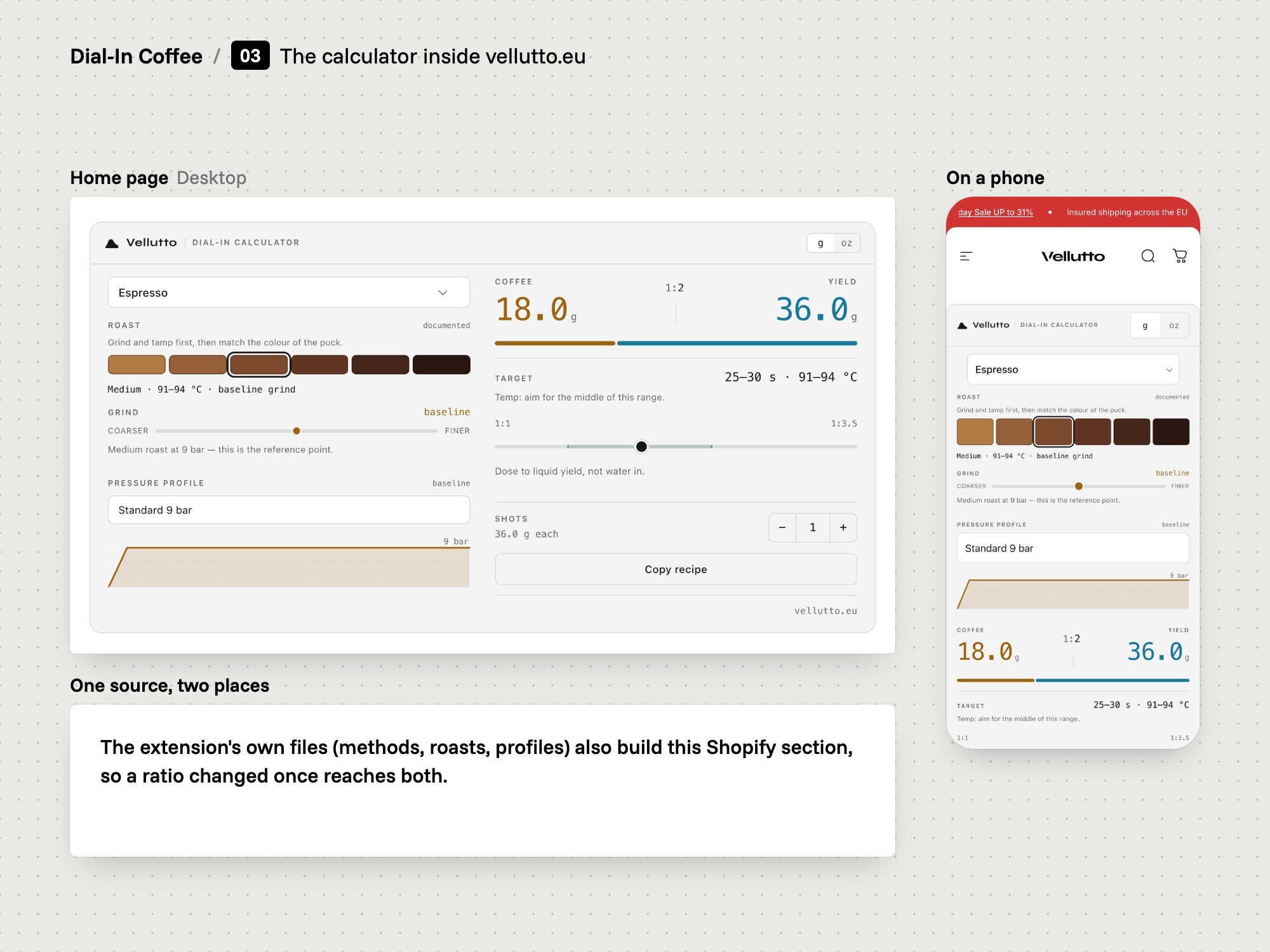
We generated the vellutto.eu calculator from the extension's own files.

  • One source, two places
  • Custom Shopify section
  • Copy a crawler can read
The problem
The same calculator had to run on the store's home page. Two copies of the same numbers drift apart as soon as one of them is edited.
Our thinking
Build the store version from the extension source every time. Then a change to a ratio reaches both places at once.
What we did
We wrote a build script that turns the extension's files into one custom Shopify section. The section sits on the vellutto.eu home page under the heading 'Espresso to filter Dial-In Calculator'.
How we did it
The calculator renders in its own shadow root, so the theme cannot restyle it by accident. The heading, paragraph and FAQ blocks around it are normal page text in the theme's own type.
What changed
On the store the calculator shows two columns on desktop, with a grind slider and a pressure chart. It keeps the visitor's last recipe in the browser and stores nothing on a server.
Board: The app: start from the bag.
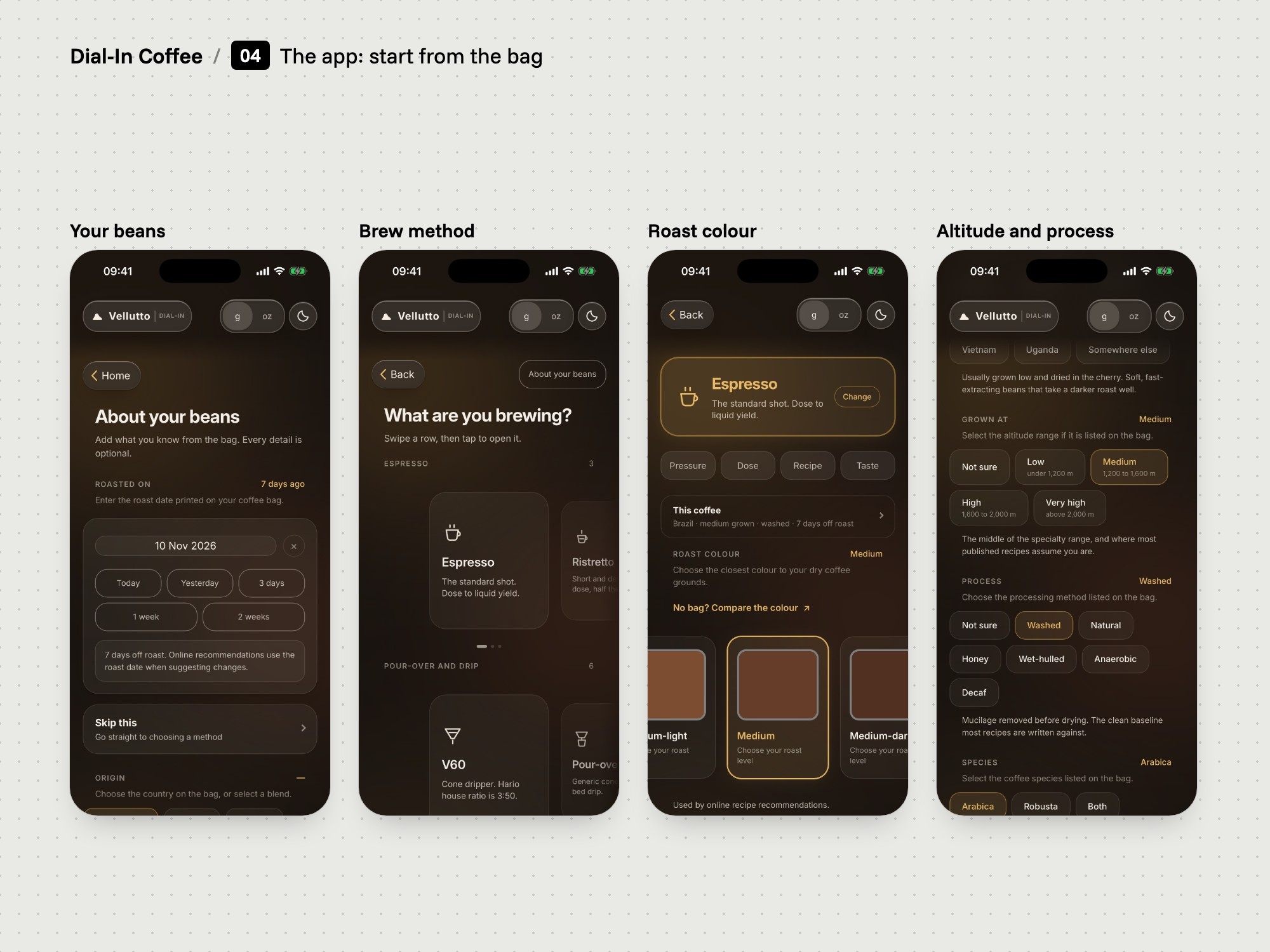
The app: start from the bag
08

The app

We built the iOS and Android app around your beans, your equipment and your pressure stages.

  • Custom pressure stages
  • Beans and equipment
  • One interface, two stores
The problem
A calculator gives a starting point for one shot. It does not know your grinder, your machine or the bag you opened, and it forgets the recipe when you close it.
Our thinking
On the phone the tool can ask more: what the coffee is, what you brew on, and stage by stage what the shot does.
What we did
We designed and developed Dial-In Coffee for iPhone, iPad and Android. You add a grinder and a machine, describe the beans, pick a method and enter each pressure stage with its time and a step or ramp transition.
How we did it
One web interface is packaged for both platforms with Capacitor, a third-party tool. Recipes, equipment and notes are saved on the device. No account is needed.
What changed
The app returns ratio, yield, shot time, water temperature and grind guidance, and recalculates when a stage changes. It guides the brew. It does not connect to or control the machine.
Board: The app: a recipe for your shot.
The app: a recipe for your shot
Board: The app: taste, fix and keep.
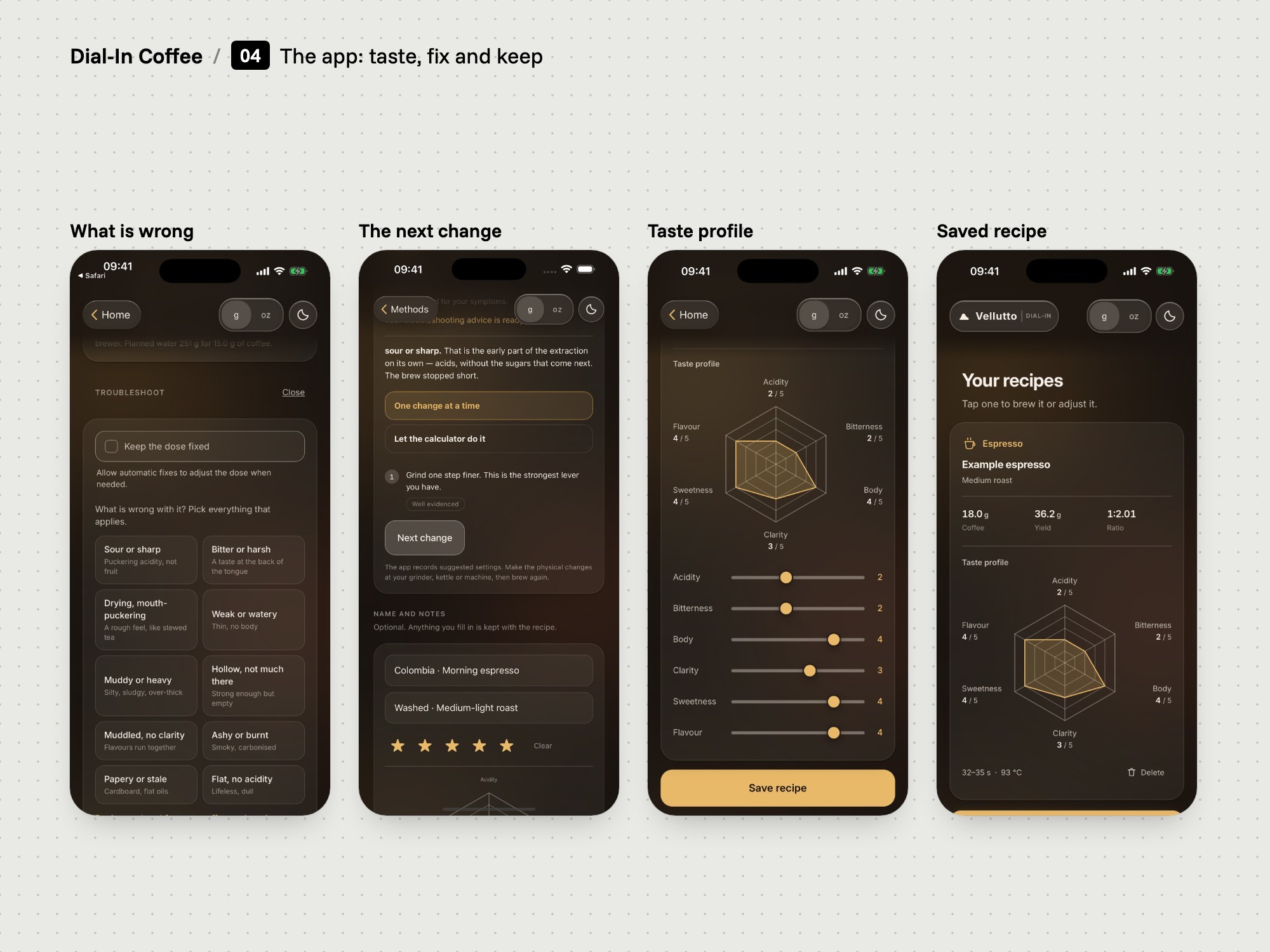
The app: taste, fix and keep
09

Taste and saved recipes

We added troubleshooting by taste and a library of saved recipes.

  • Say what you taste
  • Keep the dose fixed
  • Recipes saved on device
The problem
The first cup is rarely right. A brewer who changes grind, dose and ratio at once cannot tell which change helped.
Our thinking
After the recipe, the useful question is what to change next. Change one thing at a time, and let the brewer hold the dose still.
What we did
We built a troubleshooting step. You say what went wrong and how the brew ran, and the app suggests changes for the next attempt. 'Keep the dose fixed' holds the coffee amount while the other factors move.
How we did it
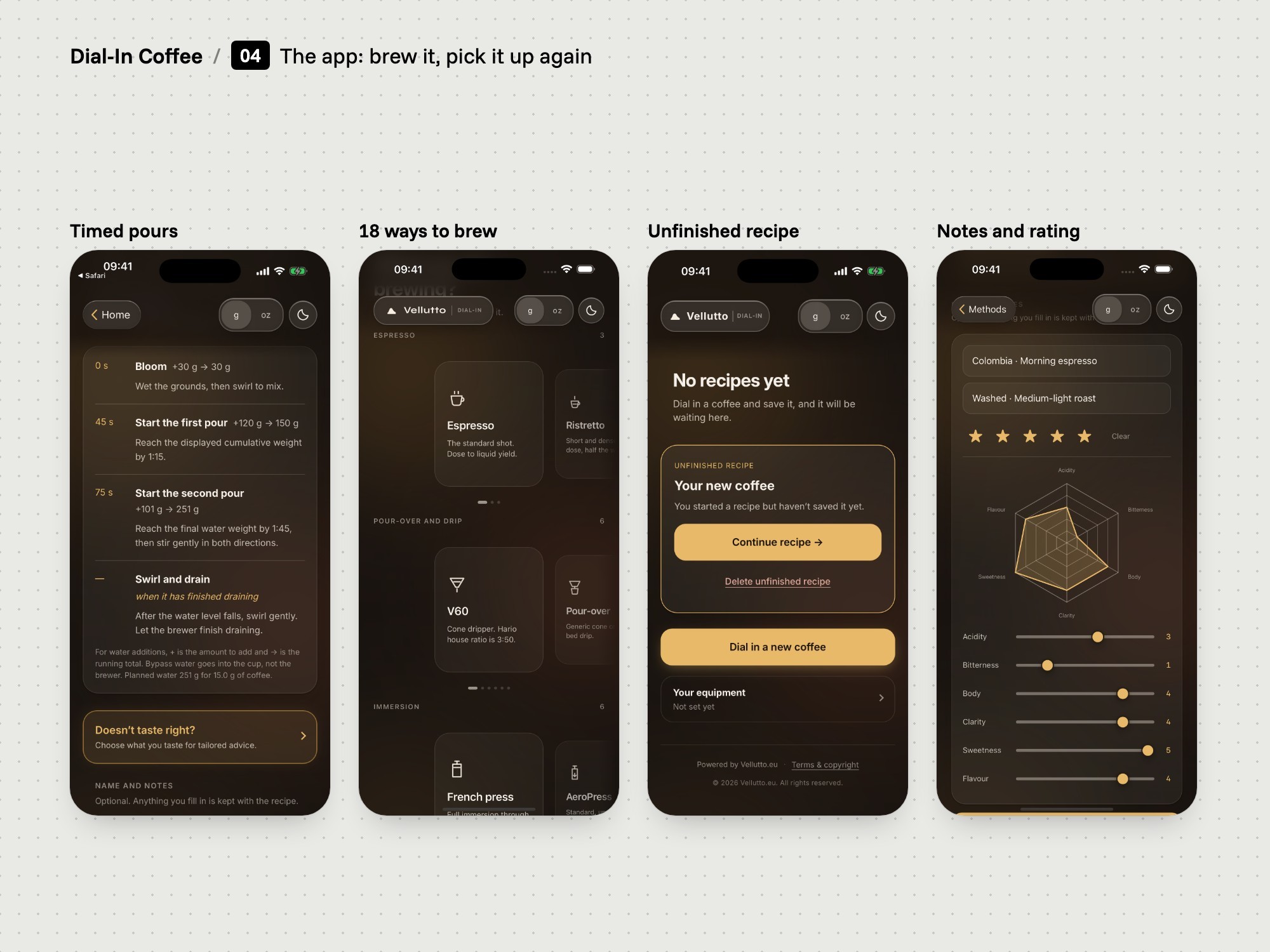
A saved recipe keeps its settings, a rating, tasting notes and a taste chart with six sliders. Filter methods show brewing steps with timed pours and running weights, and there is a brew timer.
What changed
A brewer can save a recipe, reopen it later and continue from the same settings. An unfinished recipe waits on the home screen with Continue and Delete.
Board: The app: a recipe for your shot.
The app: a recipe for your shot
10

The recipe service

We built an online service that calculates the app's recipes.

  • Runs on Cloudflare Workers
  • Recalculates on every change
  • No account
The problem
The app asks for more than the calculator does: beans, equipment, pressure stage by stage and what the cup tasted like. The recipe and the advice have to follow every one of those inputs.
Our thinking
Keep the calculation in one place. Keep the brewer's own recipes and notes on the phone.
What we did
We built an online service for recipes and troubleshooting and hosted it on Cloudflare Workers, a third-party platform. The app sends the brewing inputs and receives the recipe.
How we did it
The app recalculates when an input changes. If the connection drops it shows a 'Connection required' message with a retry button. Requests are rate limited.
What changed
Recommendations and troubleshooting need an internet connection. Saved recipes and equipment stay on the device. Both store listings say this in their descriptions.
4Release
Board: Checks before release.
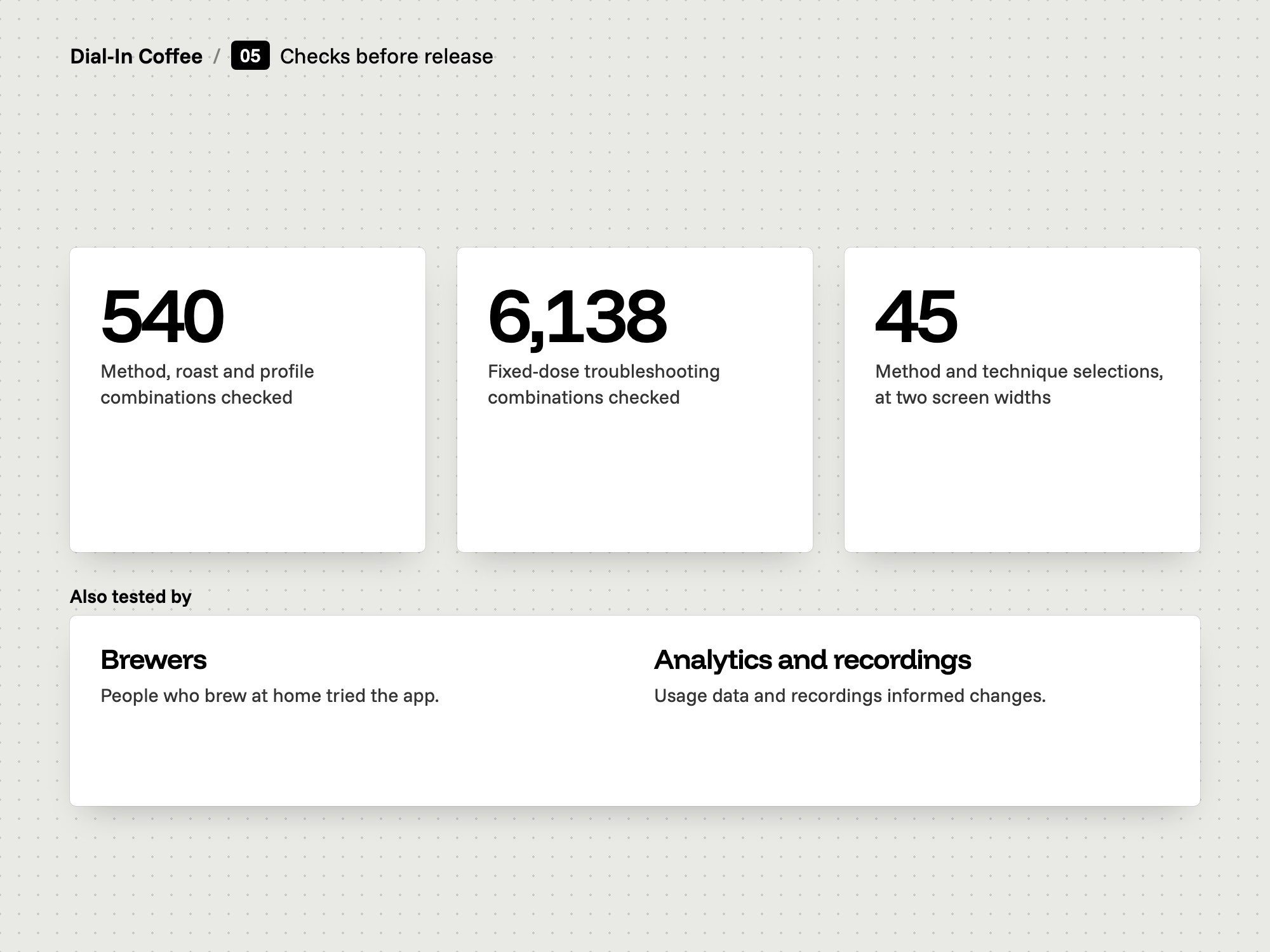
Checks before release
11

Checks before release

We ran the recipes through automated checks before release.

  • 540 recipe combinations
  • 6,138 fixed-dose cases
  • Phone and tablet widths
The problem
Method, roast, pressure profile and taste problem multiply into thousands of possible answers. Nobody can check that many by hand.
Our thinking
Check the numbers across every combination a brewer can pick, and check the screens at the sizes brewers hold.
What we did
We ran automated checks on 540 combinations of method, roast and pressure profile, and on 6,138 fixed-dose troubleshooting combinations. We also checked 45 method and technique selections at phone and tablet widths.
How we did it
The checks run against the recipe service and the app's screens. Brewers also tried the app, and analytics and recordings informed changes.
What changed
In the fixed-dose check no combination changed the dose. Each of the 45 selections matched its brewing steps. A saved espresso reopens with its own ratio.
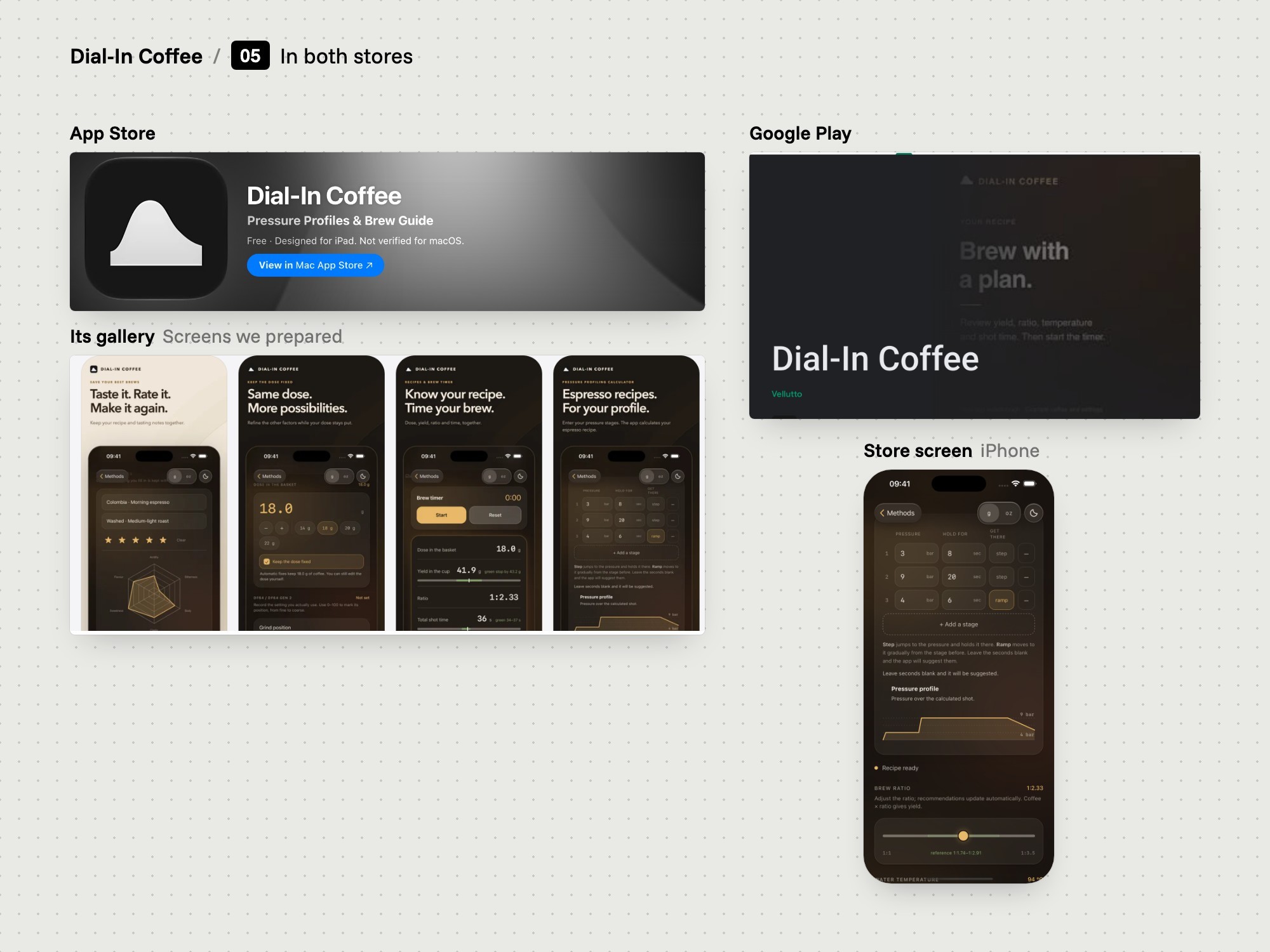
Board: In both stores.
In both stores
12

The store listings

We prepared the store listings, and the app went into both stores.

  • App Store and Google Play
  • Screens from the real app
  • Privacy policy on the store
The problem
Each store asks for its own screenshot sizes, texts and privacy answers. A listing that promises more than the app does gets rejected or misleads the buyer.
Our thinking
Show the real app and say plainly what it needs: an internet connection for recipes, and no account.
What we did
We captured screenshots from the app itself, prepared listing copy, and built image sets for iPhone, iPad and Android phones and tablets. We also prepared the app's privacy policy, which sits on vellutto.eu.
How we did it
The prepared copy says the app plans a recipe around a pressure profile and does not control the machine. The privacy labels in both stores list one data type, a device identifier.
What changed
Dial-In Coffee is free in the App Store and on Google Play, in the Food & Drink category. The App Store shows version 1.0.1 for iPhone and iPad, 3.2 MB, with iOS 15 as the minimum.
5Website and care
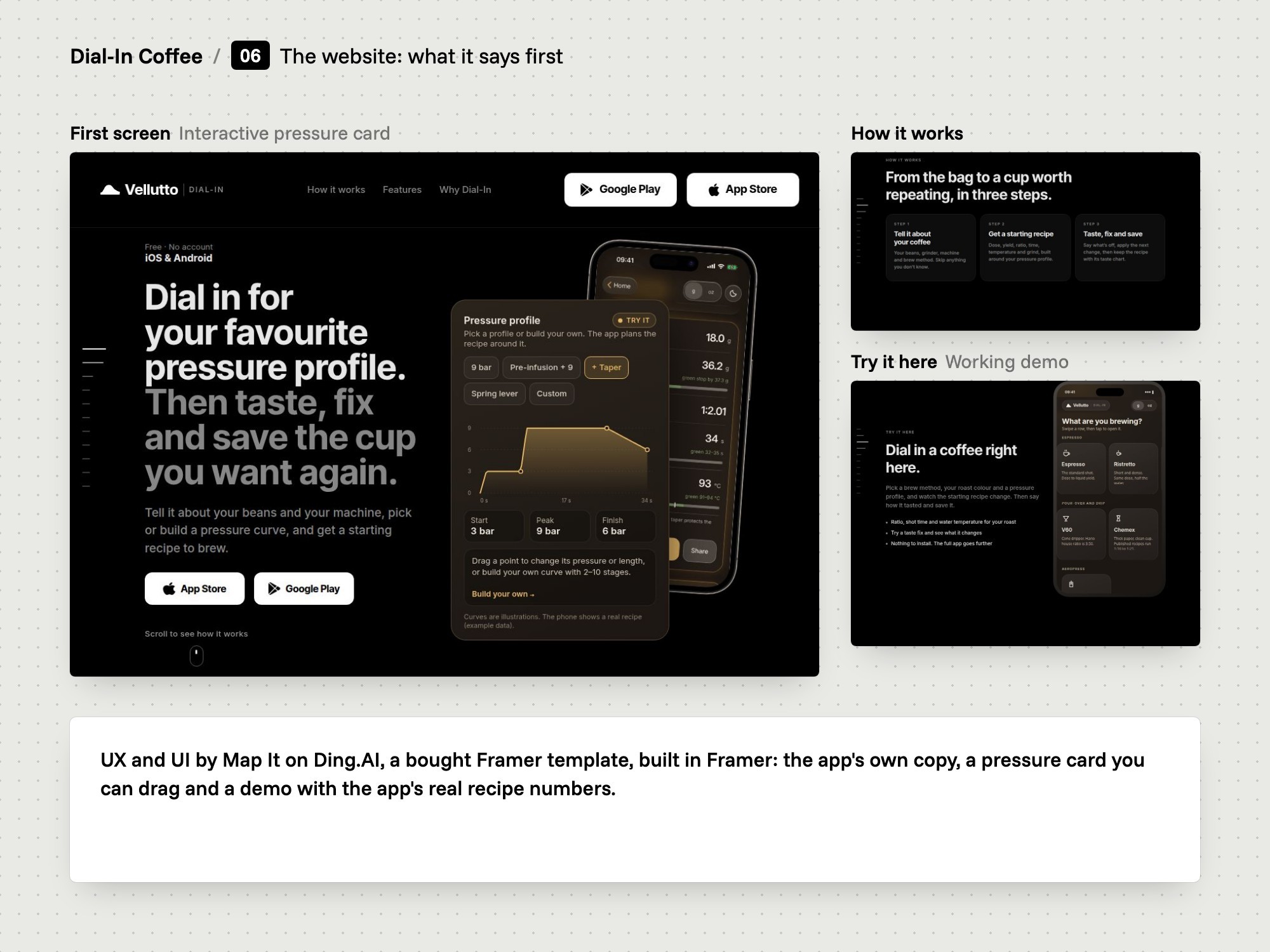
Board: The website: what it says first.
The website: what it says first
13

The website

We designed the UX and UI of the app's website on a bought Framer template and built it.

  • UX and UI by Map It
  • Ding.AI template, bought
  • Demo with the app's numbers
The problem
A store listing shows a few screenshots and a paragraph. It cannot let a brewer try a pressure profile before installing anything.
Our thinking
Use a bought app template for the standard parts and spend the effort on the one thing a template cannot have: the app itself, working on the page.
What we did
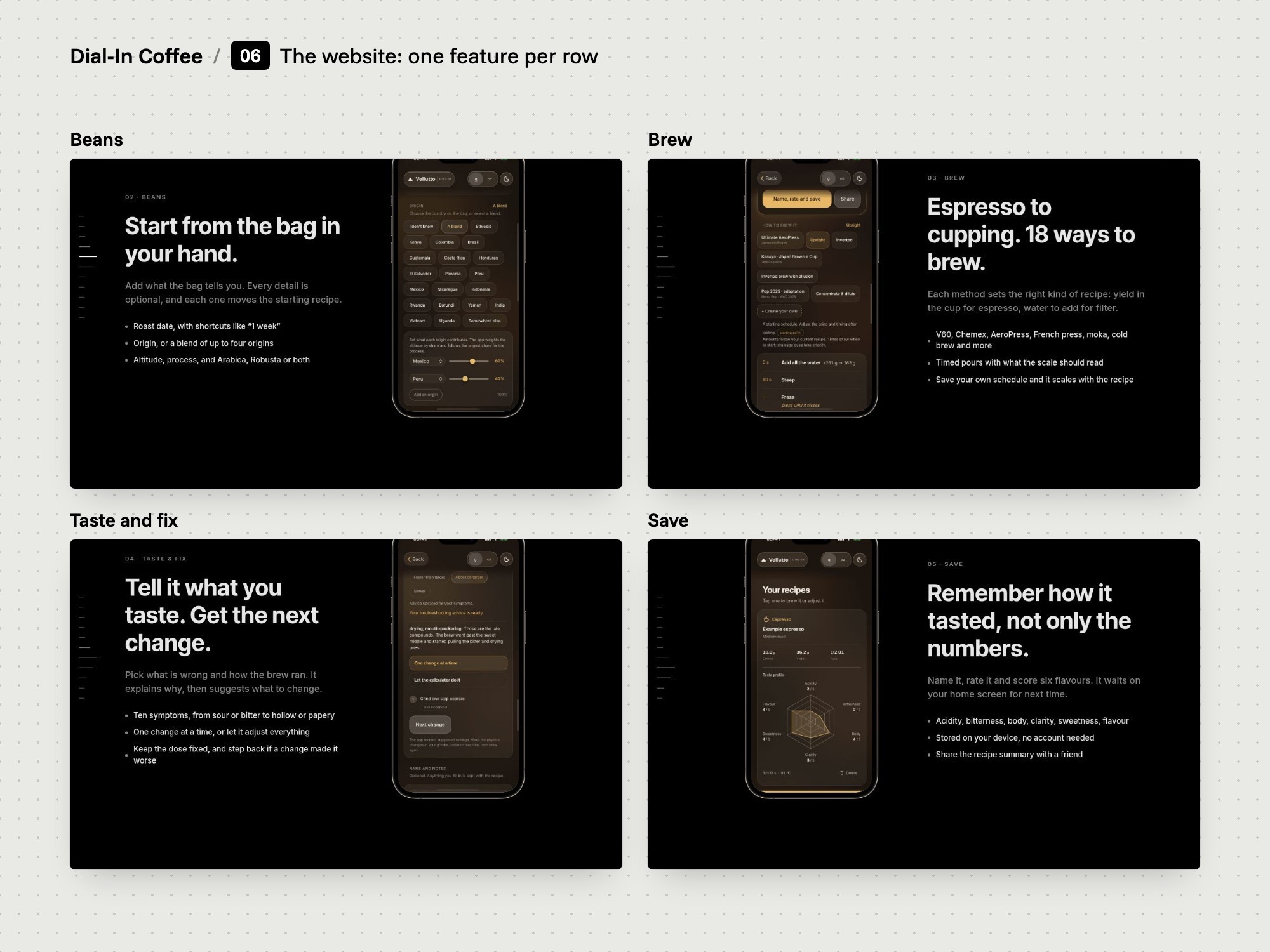
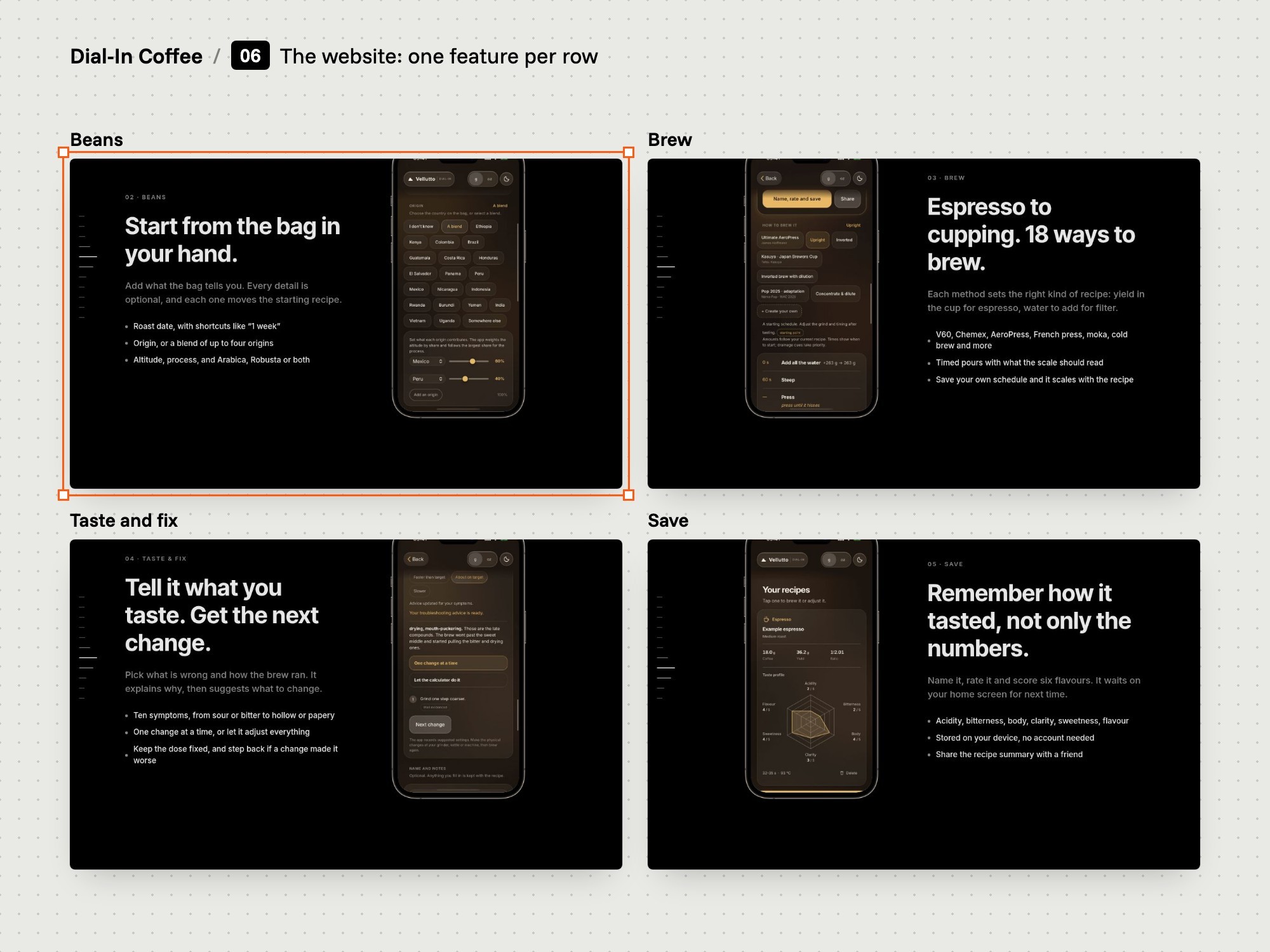
We designed the site's UX and UI on Ding.AI, a bought Framer template, and built it in Framer. The page has a hero, three how-it-works steps, feature rows for pressure, beans, brew, troubleshooting and saved recipes, and download buttons.
How we did it
We wrote two interactive parts in code. One is a pressure card where you drag the curve or edit stages. The other is a five-step demo, from beans to a saved recipe, that uses the calculator's own model for its numbers.
What changed
The demo returns the same figures as the app's own screen for a medium roast with pre-infusion and a taper: 18 g in, 36.2 g out, 34 seconds, 93 °C. The page has store buttons for the App Store and Google Play.
Board: The website: one feature per row.
The website: one feature per row
Board: The app: brew it, pick it up again.
The app: brew it, pick it up again
14

Care

We shipped version 1.0.1 after release.

  • Version 1.0.1
  • Unfinished recipes
  • Navigation and spacing
The problem
A brewer often stops halfway through a new coffee and comes back later. The recipe in progress has to be easy to pick up or to remove.
Our thinking
A recipe tool earns trust by being looked after. Small improvements, shipped soon, matter more than new features.
What we did
We shipped version 1.0.1 in September 2026. It redesigned the unfinished recipe card, added a confirmation before deleting or discarding, and improved back navigation and spacing on iPhone and iPad.
How we did it
The same update improved access to recipe sources and to step-by-step brewing instructions.
What changed
The home screen offers Continue and Delete on an unfinished recipe. Named brewing techniques in the app carry a label: adapted from a named source, reference, or starting point.

Where it is now

  • Dial-In Coffee is in the App Store and on Google Play: free, with no account.
  • Coffee Dial-In Calculator is in the Chrome Web Store, version 1.1.0.
  • The same calculator runs on the vellutto.eu home page: 18 brew methods, 6 roast levels, 5 pressure profiles.
  • A website for the app: UX and UI by Map It on a bought Framer template, built in Framer.

The task

Vellutto sells espresso equipment built around pressure profiling. We set out to build a recipe tool that asks what the machine does with pressure, and to put it in the browser, the store and the phone. Brewers tried the app.

A yellow Bolo Lemon box with a sliced lemon drizzle cake on blue

The sources and the model

Each number in the model names a published source: manufacturers, roasters and three research papers. The model covers 18 brew methods, 6 roast levels and 5 pressure profiles. Each roast says how well its number is supported.

A brown Bolo Chocolate box with a raspberry chocolate cake on pink
A pink Bolo Birthday box with a sprinkle cake and candles on yellow

The extension and the store

The calculator is a Chrome extension that works offline. The same files build the calculator section on the vellutto.eu home page, so a change to a ratio reaches both.

A sheet of red Bolo order seals on a paper bag on blue
A tower of Bolo boxes in yellow, orange and pink on mint

The app

Dial-In Coffee for iPhone, iPad and Android builds a recipe around your beans, your equipment and each pressure stage of your shot. It then helps you fix the cup and keeps what worked.

A pink Bolo Birthday candle box with twisted candles and ribbon
A box of four Bolo cupcakes on tomato red
A Bolo Carrot box tied with red ribbon on a sunny café table

Release

Before release we ran 540 recipe combinations and 6,138 fixed-dose troubleshooting combinations through automated checks. We prepared the screenshots, copy and privacy policy for both stores.

A slice of lemon drizzle cake on a pale blue plate on yellow

The website

We designed the UX and UI of the app's website on Ding.AI, a bought Framer template, and built it in Framer. It carries the app's content and a working demo.

What we delivered

  • Research: a study of coffee sources (manufacturers, roasters, the SCA Golden Cup standard and three research papers) and of competing apps. Brewers tried the app, and analytics and recordings informed changes.

  • The recipe model: 18 brew methods, 6 roast levels and 5 pressure profiles, with capped effects and a confidence label on each roast.

  • Dial-In Coffee for iOS and Android: UX and UI design and development. Pressure stages with a chart, beans and equipment, troubleshooting, a brew timer and saved recipes. Free, with no account.

  • Coffee Dial-In Calculator for Chrome: the calculator in the browser toolbar. It works offline and asks for one permission, storage.

  • The calculator on vellutto.eu: a custom Shopify section on the home page, generated from the same source as the extension.

  • An online recipe service: calculation and troubleshooting for the app, hosted on Cloudflare Workers.

  • Release: automated checks of the recipes, prepared screenshots and copy for the App Store and Google Play, and the app's privacy policy.

  • A website for the app: UX and UI designed by Map It on Ding.AI, a bought Framer template, and built in Framer, with two interactive parts we wrote in code.

After release

The extension is in the Chrome Web Store, version 1.1.0, updated in August 2026. The app is in the App Store and on Google Play. Version 1.0.1 for iPhone and iPad followed in September 2026. It made unfinished recipes easier to continue or delete and improved navigation on iPhone and iPad.
Credits

Map It: research, the recipe model, UX and UI design of the app and its website, development of the iOS and Android app, the Chrome extension, the Shopify calculator section, the online recipe service and the store listing materials.

Third-party tools: Capacitor packages the app for iOS and Android. Cloudflare Workers hosts the recipe service. The store runs on Shopify. The website is built in Framer on Ding.AI, a bought third-party template, on which Map It designed the UX and UI. Syne and Inter Tight are third-party typefaces. The ratios and research the model draws on belong to the sources named in it.

Client

Vellutto, an espresso equipment store in Bussum, the Netherlands

Category

App

Year

2026

Services

Research

Recipe model

UX and UI design

App development

Chrome extension

Website

Contact

© 2026 Map It, KVK 98282859, VAT NL005321010B77

Cookies and storage

This site sets no cookies of its own. With your permission it loads the booking calendar straight away and remembers your planner and camera choices in your browser. Privacy and cookies